Home Blogs About Us Contact Us
📞 0777 554 225 Get In Touch
💸 ERP Module

Cash Book &
General Ledger

Every rupee in and out of the bank, reconciled, and every posting in the ledger.

AccSoft ERP's Cash Book and General Ledger module is where every other module lands. Cheques, payment vouchers, deposits and journals are approved before they post, the cash book always matches the bank, and the trial balance, profit and loss and balance sheet are ready at any level of detail the moment you need them.

AccSoft ERP Cash Book and General Ledger module dashboard banking workflow Sri Lanka

The Banking Workflow

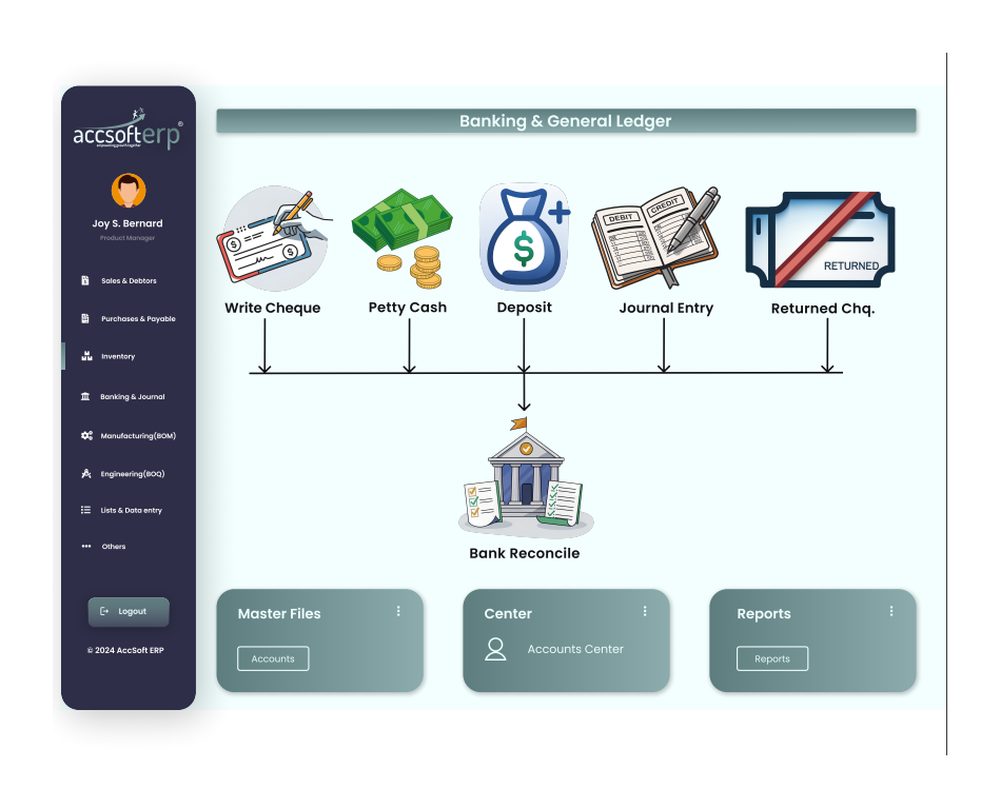
Five banking documents feed one bank reconciliation, exactly as the module dashboard shows it.

1
🖊
Write Cheque
Pay a supplier, an expense or a salary with the cheque number, payee, account coding and Class on one screen. Post-dated cheques issued are tracked until they clear.
2
📋
Payment Voucher
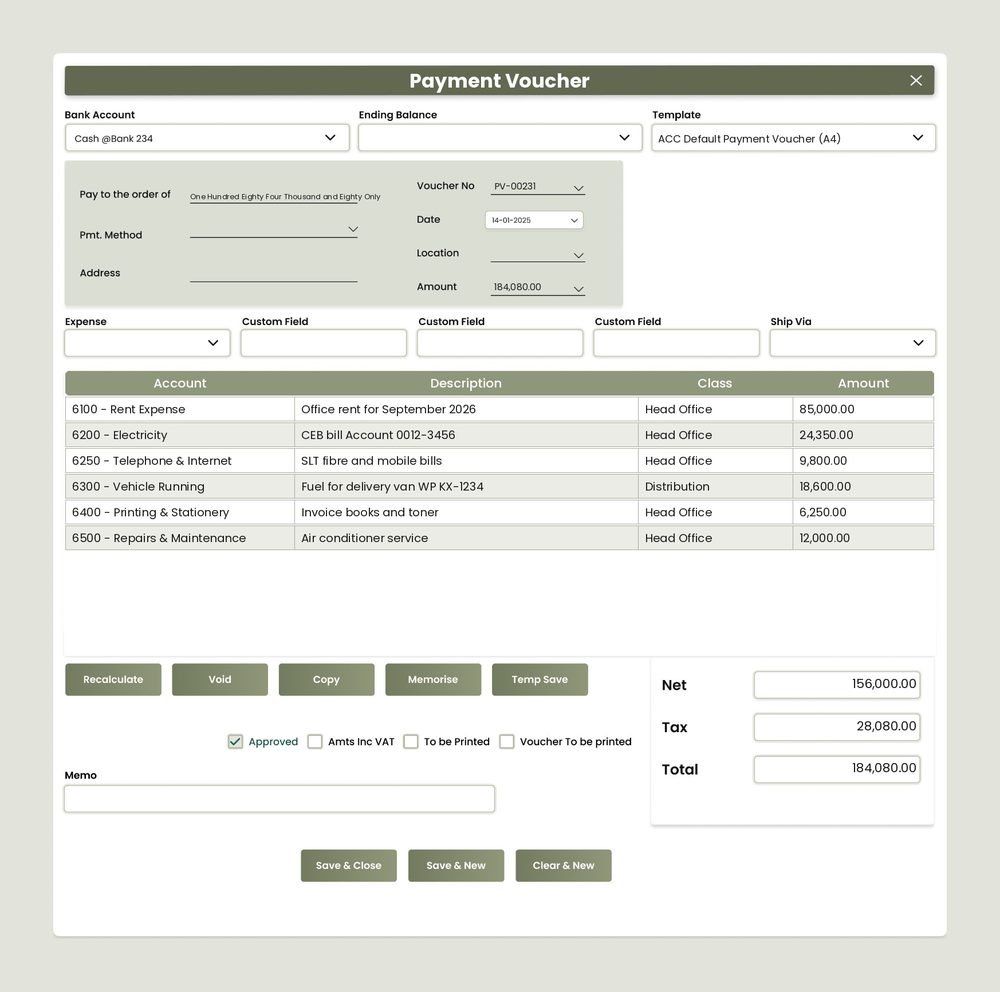
Record cash and bank payments for expenses, with account, description, Class and amount per line and VAT captured where applicable. Amount in words prints on the voucher.
3
🏦
Deposit
Bank the day's receipts, cheques and PD cheques from Sales and Debtors in one deposit slip, posted to the bank account.
4
📄
Journal Entry
Post accruals, prepayments, depreciation, provisions and corrections with debit and credit lines, Class and memo.
5
❌
Returned Cheque
Reverse a bounced customer cheque, reinstate the debtor balance and record bank charges in one step.
6
✅
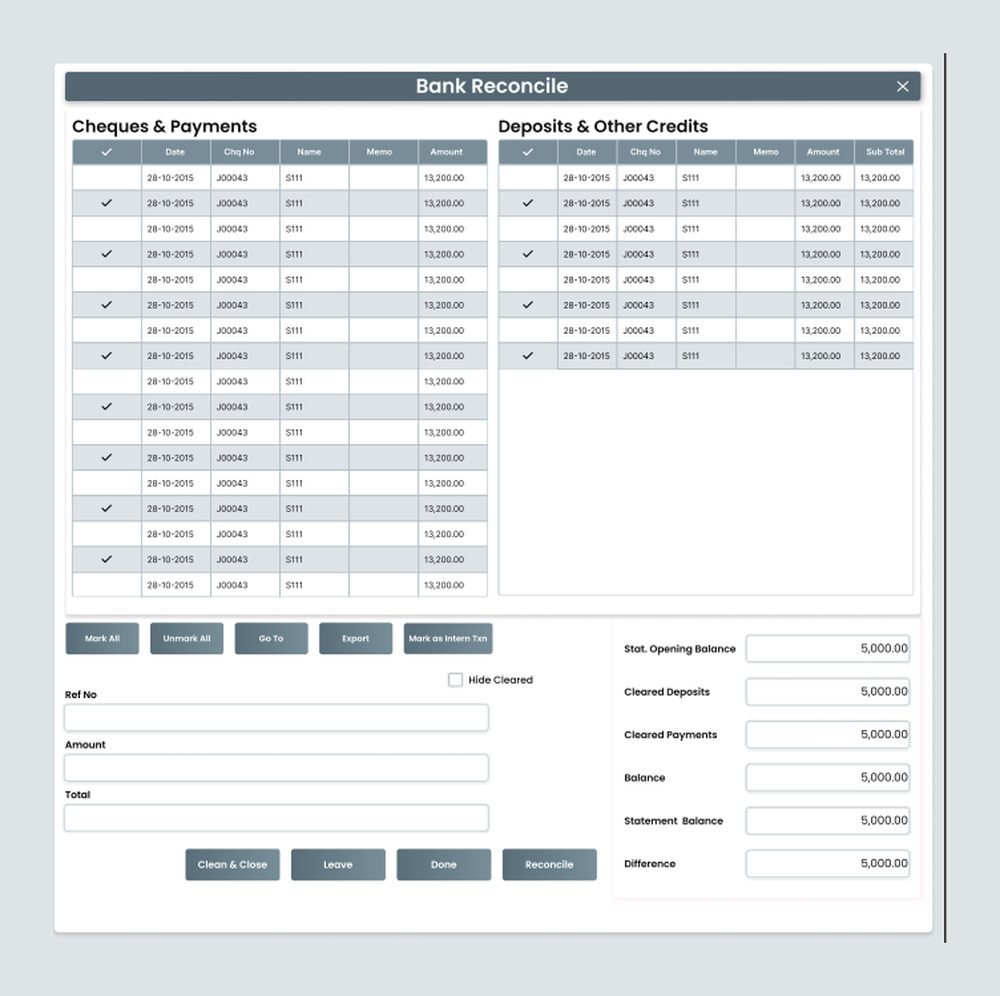
Bank Reconcile
Tick cleared items against the bank statement. Opening balance, cleared totals and difference shown live. Reconcile locks the period when the difference is zero.
AccSoft ERP Cash Book and General Ledger workflow dashboard: write cheque, payment voucher, deposit, journal entry, returned cheque, bank reconcile
Module dashboard: five banking documents feeding one bank reconciliation

Approval Control on Every Document

The cash book is where money actually moves. AccSoft ERP puts an approval level on every banking document. No unauthorised payment leaves the bank and no unauthorised posting reaches the ledger.

🖊
Write Cheque
Approved before printing or posting to the bank ledger.
✓ Approval Required
📋
Payment Voucher
Approved before it posts cash or bank expenses to the ledger.
✓ Approval Required
🏦
Deposit
Approved before it increases the bank balance in the ledger.
✓ Approval Required
📄
Journal Entry
Approved before it posts to the General Ledger.
✓ Approval Required
❌
Returned Cheque
Approved before it changes a customer balance and posts bank charges.
✓ Approval Required
✅
Bank Reconciliation
Completed and locked only when the difference reaches zero.
✓ Locked at Zero

See It in Action

Every screen is built for Sri Lankan businesses, with VAT, post-dated cheques and local document formats included as standard.

AccSoft ERP Payment Voucher screen with expense lines coded to account and Class, VAT and amount in words
Payment Voucher with expense lines, VAT at 18% and amount in words
AccSoft ERP Bank Reconcile screen with cleared cheques, payments and deposits and the difference shown live
Bank Reconcile with cleared items ticked and the difference shown live

40 Ready-Made Reports

Filterable by date range, account, Class and location. Exportable to Excel and PDF.

Bank and Cash Book 8
  • Cash Book with PD Issued
  • Cheque Details (Expenses)
  • Write Cheque Summary
  • Petty Cash Summary
  • To be Deposit Details
  • Bank Deposit Details
  • Bank Reconciliation
  • Bank Reconciliation With Details
Financial Statements 32
Trial Balance and General Ledger
  • Trial Balance
  • General Ledger (Include Opening Balance)
  • General Ledger (Account Type Wise)
  • General Ledger (Exclude Opening Balance, Faster)
  • General Ledger MC
Profit and Loss
  • Profit and Loss Standard: Level 0, 0Y, 1, 2, 3, 4
  • Profit and Loss By Month
  • Profit and Loss By Class
  • Profit and Loss By Customer
  • Extended Profit and Loss Report
Budgets vs Actuals
  • Profit and Loss Budgets Vs Actuals: Level 0, 1, 2, 3, 4
  • Profit and Loss Budgets Vs Actuals (Class Wise)
Balance Sheet
  • Balance Sheet: Level 0, 1, 2, 3, 4
  • Balance Sheet Month Wise
  • Balance Sheet (UK Format): Level 0, 1, 2, 3, 4

Why AccSoft ERP for Banking and Accounts?

Everything lands here and it is always current.

🔗
Everything Lands Here
Invoices and receipts from Sales and Debtors, bills and payments from Purchases and Payables, stock movements from Inventory, and job costs from Manufacturing, Engineering and Workshop all post to the General Ledger automatically, with no re-keying.
🔒
Controlled Payments
Approval levels on cheques, vouchers, deposits and journals mean no unauthorised payment or posting reaches the bank or the ledger. Every document shows its Approved status at a glance.
✅
Reconciled, Not Estimated
The bank reconciliation screen matches the cash book to the statement line by line, with the difference on screen until it reaches zero. No period closes with unresolved items.
📊
Statements at Every Level
Profit and loss and balance sheet from a one-page summary (Level 0) to full account detail (Level 4), by month, by Class, against budget, and in UK format for overseas reporting.
📈
Familiar to QuickBooks Users
Write Cheque, Deposit, Journal Entry, Bank Reconcile and Accounts Centre follow the layout QuickBooks users already know, with the depth and control of a full ERP on top.
🌟
Proven Since 1998
AccSoft Solutions has supported Sri Lankan businesses for over 25 years, with more than 5,000 active installations across every industry and company size.
Who Uses This Module?

Every AccSoft ERP customer, since every other module posts to the General Ledger.

Every AccSoft ERP customer, since all other modules post here automatically
Finance teams reconciling several bank accounts each month
Businesses issuing and receiving post-dated cheques who need the true available bank balance
Groups reporting profit and loss by branch, department or project using Class analysis
Companies managing annual budgets and comparing actuals vs budgets at any level
Subsidiaries of UK and overseas parents requiring UK-format balance sheets at all five levels

Frequently Asked Questions

Common questions about the Cash Book and General Ledger module.

Which banking documents require approval?
All of them. Cheques, payment vouchers, deposits, journal entries and returned cheques each carry an approval level, and user permissions control who can approve. A bank reconciliation is locked only when the difference is zero.
How does bank reconciliation work?
Cheques and payments appear on the left and deposits and credits on the right. Tick each item that appears on the bank statement, enter the statement balance, and the screen shows cleared totals and the difference live. When the difference is zero, Reconcile closes the period. The system also supports online bank reconciliation.
Are post-dated cheques we issue tracked?
Yes. The Cash Book with PD Issued report shows the bank balance including cheques written but not yet presented, so you always know the true available balance before issuing another payment.
What levels of profit and loss and balance sheet are available?
Five levels, from Level 0 (one-page summary) to Level 4 (every account). Both statements are also available month wise, and the profit and loss by Class and by customer. Balance sheets can be produced in UK format at all five levels.
Can we compare against budget?
Yes. Enter a budget per account and run Profit and Loss Budgets vs Actuals at any of the five levels, or Class wise for departmental or branch budgets.
Can we keep foreign currency bank accounts?
Yes. Each bank account has a currency, every document carries an exchange rate, and the General Ledger MC report shows the ledger in the original currency.
Does the rest of the system post here automatically?
Yes. Sales, purchasing, inventory, manufacturing, engineering and workshop transactions post to the General Ledger when they are approved, so the trial balance is always current.

Explore More AccSoft ERP Modules

Every module posts to Cash Book and General Ledger automatically.