Home Blogs About Us Contact Us
📞 0777 554 225 Get In Touch
📱 ERP Module

Mobile Sales Force

Your sales reps sell from the phone, and the ERP knows by the time they leave the shop.

AccSoft SalesForce is the Android app for field sales teams. Reps take sales orders, raise invoices and sales receipts, issue credit notes and collect payments at the customer's counter, with the latest items, prices and customer balances from AccSoft ERP on the phone. It works with no signal and uploads everything when the rep taps Sync.
AccSoft SalesForce home screen AccSoft SalesForce sales order screen

What the Rep Does from the Phone

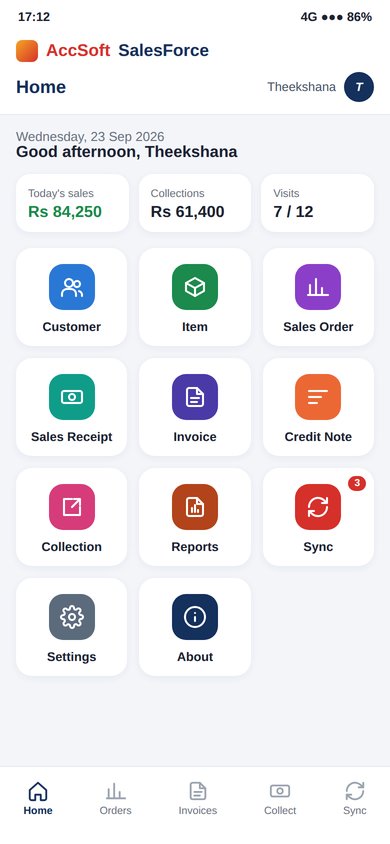
The home screen is eleven tiles, one per job. Everything the rep needs for a full day on the road, on a single screen.

👥
Customers
Route customers with address, contact, credit limit, balance and ageing, refreshed at every sync.
🏷
Items
Price list with stock on hand, by type and category, with item pictures.
📋
Sales Order
Three-step order for delivery from the warehouse: Customer, Items, Final.
💲
Sales Receipt
Van sales: goods handed over and paid for on the spot.
📝
Invoice
Credit sales invoiced at the customer's counter against their credit limit.
↩
Credit Note
Returns and price adjustments raised on the spot.
🏦
Collection
Cash and cheque collections against outstanding invoices, with post-dated cheque details.
📊
Reports
Day summary, outstanding by customer and target vs actual.
AccSoft SalesForce home screen with today's figures and one tile per job
Home: today's figures and one tile per job
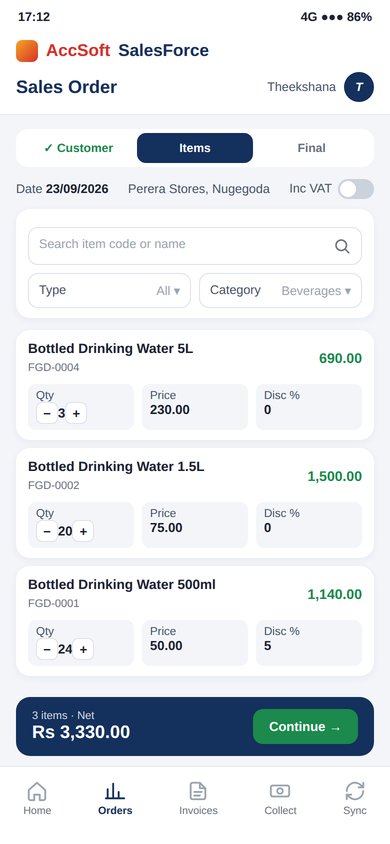
AccSoft SalesForce sales order items step with quantity, price and discount
Sales Order: items with quantity, price and discount
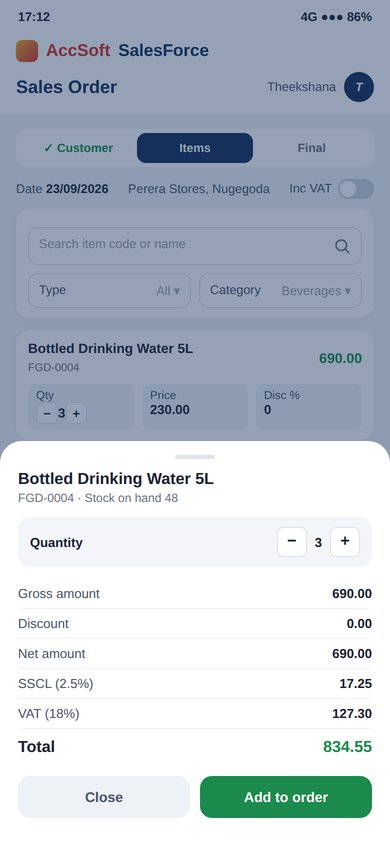
AccSoft SalesForce item total with SSCL 2.5% and VAT 18%
Item total with SSCL 2.5% and VAT 18%
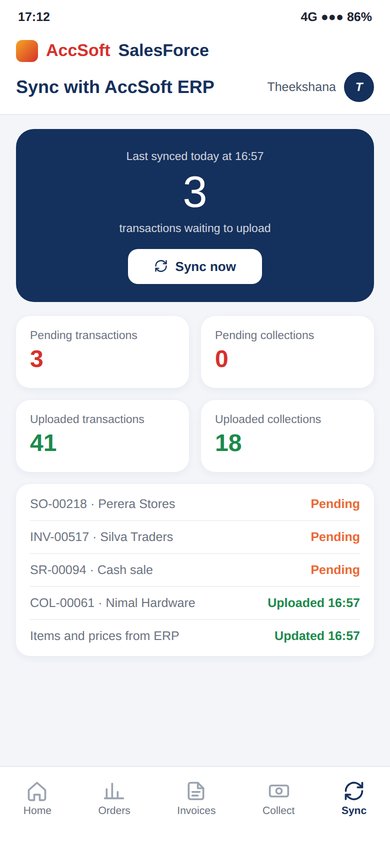
AccSoft SalesForce sync screen with pending and uploaded counts
Sync: pending and uploaded counts

Taking an Order in Three Steps

Sales Order, Invoice, Sales Receipt and Credit Note all use the same three steps, so a rep learns the app in one morning.

1
Customer
Pick the customer from the route list. Outstanding balance, credit limit and last order are shown before the rep starts, so an over-limit customer is caught at the first step before any item is added.
2
Items
Search by code or name, or filter by type and category. Each item opens a card with the quantity stepper, price, discount and line total. The totals sheet shows Gross, Discount, Net, SSCL (2.5%), VAT (18%) and Total before the rep taps Add to order.
3
Final
Review all lines, add a memo and delivery date, choose Amount Inc VAT if the customer is quoted tax-inclusive, and save. The order queues for upload and prints on a Bluetooth printer if the customer wants a copy.

Works Without Signal, Syncs with One Tap

A shop in a basement or a village with no coverage never stops a sale.

⚡ Always Ready
Offline First, Sync When Ready
  • Every order, invoice, receipt, credit note and collection is saved on the phone first
  • The Sync screen shows Pending Transactions and Pending Collections with a count badge
  • Tap Sync to upload everything pending and download the latest items, prices, customers and balances
  • Uploaded documents appear in AccSoft ERP as sales orders, invoices, receipts, credit notes and customer payments, ready for approval and posting
  • The Sync tile on the home screen carries the pending count, so nothing is left on the phone at the end of the day
💸 Collections
Collections and Post-Dated Cheques
  • Collect against one or several outstanding invoices, in full or in part
  • Cash, cheque and post-dated cheque, with bank, cheque number and cheque date captured
  • Receipt printed on the spot from a Bluetooth printer
  • Collections upload separately from sales, so the accounts team sees the day's cash as soon as the rep syncs
  • Customer balance and ageing on the phone update after every sync

Key Features

Everything a field sales team needs, integrated with AccSoft ERP.

📱
Built for the Rep
  • Large touch targets and quantity steppers for one-handed use
  • Item pictures on the price list
  • Home screen tiles for today's sales, collections and visits
  • Works on ordinary Android phones and tablets
🇳🇰
Pricing and Tax
  • Price levels per customer from the ERP
  • Line and bill discounts within the rep's limit
  • VAT and SSCL calculated per line and on the total
  • Amount Inc VAT option for tax-inclusive customers
🔒
Credit Control on the Road
  • Credit limit and outstanding balance shown before the order is taken
  • Overdue invoices flagged on the customer card
  • Collections applied to specific invoices
📷
Printing
  • Bluetooth thermal printers for orders, invoices, receipts and collection receipts
  • Your logo, VAT registration number and VAT and SSCL breakdown on the print
📄
Reports on the Phone
  • Day summary: orders, invoices, receipts and collections today
  • Outstanding by customer, with ageing
  • Target vs actual for the rep
  • Pending and uploaded transaction lists
📈
Back-Office Reporting
  • Sales by Sales Rep Summary and Details in AccSoft ERP
  • Sales by Sales Rep / Customer, Item, Class and Location
  • Collection Report Details by Transaction Date
  • Dashboard graphs: Sales Rep Wise Sales, Daily Sales, Customer Balance

Why AccSoft SalesForce?

The field team and the back office, always in step.

🔗
No Re-Keying
Orders taken in the field arrive in Sales and Debtors as documents, not as phone calls or WhatsApp photos to be typed in. Collections post to the Cash Book the same way.
⚡
No Signal Needed
The rep keeps selling with no coverage. The upload waits for the next moment of connectivity. A village shop or a basement counter never stops a sale.
💸
Cash Accounted For
Collections upload separately with cheque details, so the day's takings are visible in the office the moment the rep syncs. No cash unaccounted for at month end.
🔒
Credit Checked at the Counter
Balance, limit and overdue invoices are on the phone before the order is taken. Over-limit customers are caught at the Customer step, before any item is added to the order.
✅
Same Rules as the Office
Uploaded documents go through the same approval levels as anything keyed in the ERP. The field team operates within the same controls as the back office.
🌟
Proven Since 1998
AccSoft Solutions has supported Sri Lankan businesses for over 25 years, with more than 5,000 active installations across FMCG, pharmaceutical, hardware, beverage and more.

Who Uses AccSoft SalesForce?

Any business whose reps take orders and collect payments at the customer.

FMCG and food distributors with van sales and route reps
Pharmaceutical distributors with medical reps taking orders
Building materials and hardware suppliers with territory reps
Beverage and bottled water distributors
Any business whose reps take orders and collect payments at the customer
Multi-route operations where each rep sees only their own customers and locations

Frequently Asked Questions

Common questions about AccSoft SalesForce.

Does the app need internet to take an order?
No. Orders, invoices, receipts, credit notes and collections are saved on the phone and uploaded when the rep taps Sync with coverage. A basement shop or a rural route never stops a sale.
How does the office see what the rep did?
On sync, each document arrives in AccSoft ERP as a sales order, invoice, receipt, credit note or customer payment, ready for approval. The dashboard and Sales by Sales Rep reports update at the same time.
Can the rep see the customer's balance?
Yes. Outstanding balance, credit limit, ageing and overdue invoices are on the customer card, refreshed at every sync. An over-limit customer is flagged before the order is taken.
Are VAT and SSCL handled?
Yes. VAT and SSCL are calculated per line and on the total, and an Amount Inc VAT option handles customers quoted tax-inclusive prices. VAT and SSCL print on the receipt with your registration number.
Can the rep print at the customer?
Yes. Orders, invoices, receipts and collection receipts print on a Bluetooth thermal printer with your logo and VAT details.
How are collections and post-dated cheques handled?
Collections are taken against specific invoices with cash, cheque or post-dated cheque details, upload separately from sales, and post to Sales and Debtors and the Cash Book in the ERP.
Which phones does it run on?
Android phones and tablets. Each rep logs in with their own ERP user and sees only their customers, items and locations.

Explore More AccSoft ERP Modules

AccSoft SalesForce connects with Sales, Inventory, Cash Book and Dashboards in AccSoft ERP.