Home Blogs About Us Contact Us
📞 0777 554 225 Get In Touch
👥 ERP Module

Sales & Debtors

From quotation to cash in the bank, with every customer balance up to date.

AccSoft ERP's Sales and Debtors module runs the full quote-to-cash cycle. Every document, from quotation to receipt, passes through an approval level before it moves on, and each step is created from the one before it, so line items, taxes and customer details never have to be re-typed. Your debtors ledger, ageing and post-dated cheques are always current.
AccSoft ERP Sales and Debtors module dashboard quote to cash workflow Sri Lanka

The Quote-to-Cash Workflow

Eight documents, one chain. Each is created from the previous one and carries its own approval status, so sales and accounts teams can see exactly where a deal stands.

1
📄
Quotation
Price the customer's request with item, quantity, rate, discount, VAT and SSCL per line. Print or email on your own template.
2
📋
Sales Order
Convert the accepted quotation with Select Quote. Convert to a Purchase Order or BOM for made-to-order items.
3
📝
Invoice
Bill the customer in full or in part from the sales order. Partial deliveries tracked per line.
4
💸
Receive Payment
Settle invoices by cash, bank transfer, cheque or post-dated cheque, matched to specific invoices.
5
💲
Sales Receipt
Record cash sales where invoice and payment happen together in one step.
6
↩
Refunds and Credits
Raise credit notes for returns and price adjustments, then refund or apply to open invoices.
7
🏦
Deposit
Bank the day's receipts and cheques in one deposit slip, posted to the bank ledger.
8
❌
Returned Cheque
Reverse a bounced cheque, reinstate the customer balance and record bank charges.
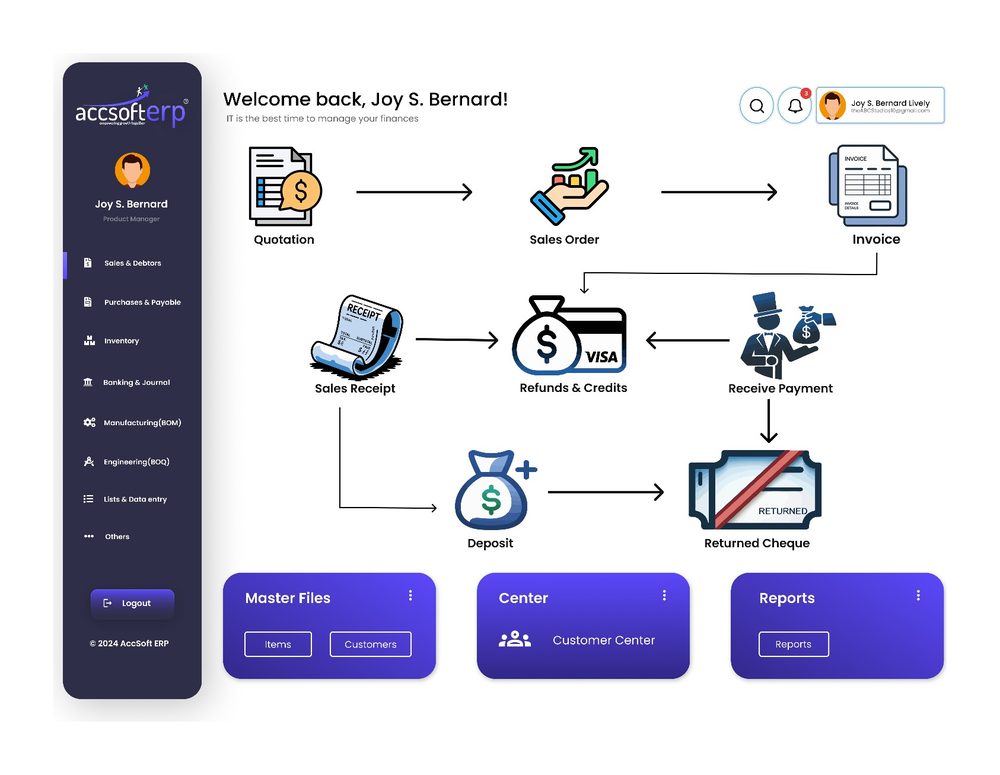
AccSoft ERP Sales and Debtors workflow dashboard: quotation, sales order, invoice, receive payment, sales receipt, refunds and credits, deposit, returned cheque
Module dashboard: the quote-to-cash workflow

Approval Control on Every Document

Sales is where revenue and credit exposure are created. AccSoft ERP puts an approval level on every sales document. User permissions decide who can approve at each stage, so unauthorised discounts, credit notes or over-limit sales are stopped before they happen.

📄
Quotation
Approved before it can be converted into a sales order.
✓ Approval Required
📋
Sales Order
Approved before invoicing, delivery or conversion to a purchase order.
✓ Approval Required
📝
Invoice
Approved before printing, emailing or posting to the debtors ledger.
✓ Approval Required
💸
Receipts and Payments
Approved before they hit the bank or clear customer balances.
✓ Approval Required
🏦
Deposit
Approved before posting to the bank ledger.
✓ Approval Required
↩
Credit Notes and Returns
Approved before they change a customer balance.
✓ Approval Required

See It in Action

Every screen is built for Sri Lankan businesses, with VAT, SSCL, post-dated cheques and local tax invoice formats included as standard.

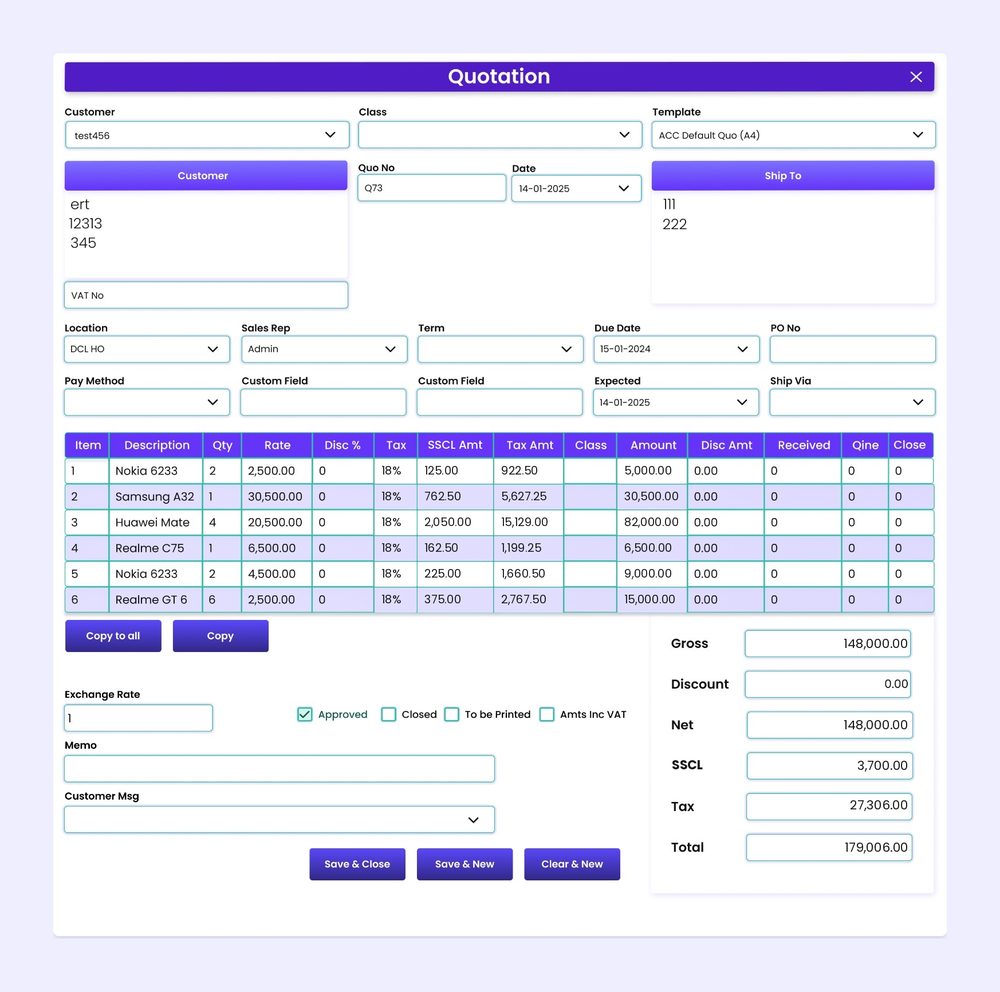
AccSoft ERP Quotation screen with VAT 18% and SSCL 2.5% per line and live totals sales ERP Sri Lanka
Quotation with VAT and SSCL calculated per line
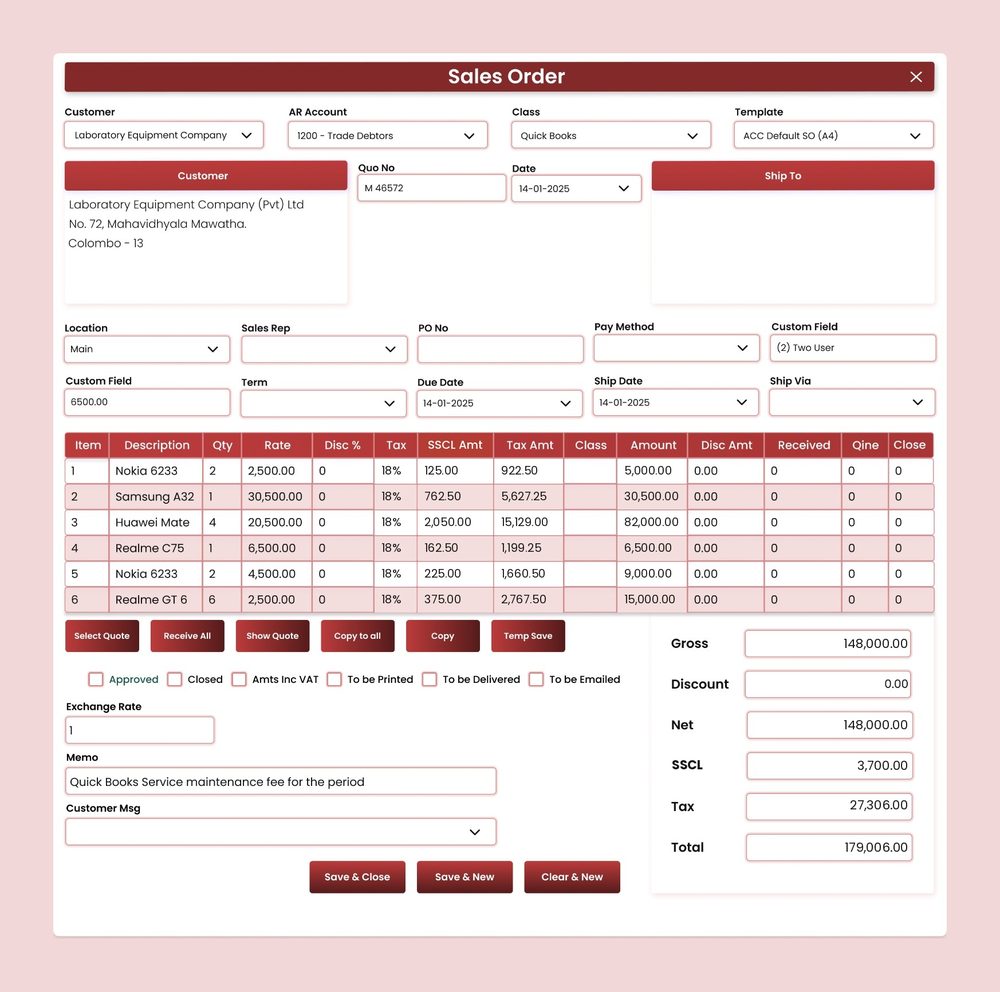
AccSoft ERP Sales Order screen ready for invoicing, purchase order or BOM conversion order processing ERP Sri Lanka
Sales Order with delivered, invoiced and closed quantities per line
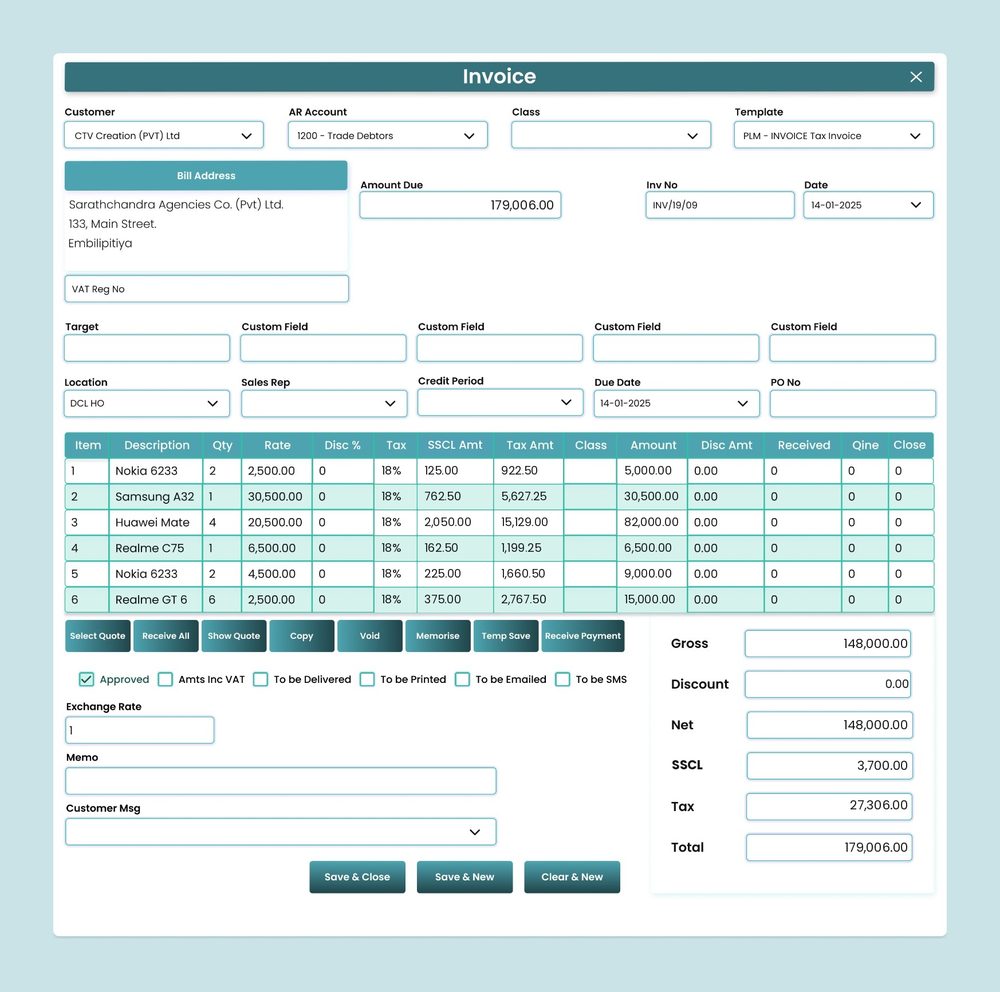
AccSoft ERP Tax Invoice screen with Amount Due, credit period and Receive Payment VAT invoice Sri Lanka
Tax Invoice with Amount Due and Receive Payment

76 Ready-Made Reports

Filterable by date range, customer, sales rep, location and Class. Exportable to Excel and PDF.

Quotations and Orders 8
  • Quotation Summary (All / Open / Over Due)
  • Quotation Details (All / Open)
  • Sales Order Summary (All / Open / Over Due)
  • Sales Order Details (All / Open)
  • Sales Order to Purchase Order
  • Sales Order to BOM
Invoices and Delivery 10
  • Invoice Summary and Details
  • Credit Note Summary and Details
  • Delivery Order Summary and Details
  • Item To Be Delivered Summary and Details
  • Sales Vs Sales Return
Sales Analysis 37
  • Sales by Item, Customer, Sales Rep
  • Sales by Location, Class, Customer Type
  • 20 cross-analysis reports
  • Gross Profit by Item
Customer Balances 7
  • Customer Balance Summary and Details
  • Foreign Currency Balance Details
  • Customer Balance With PD Cheque
  • PD Cheque Ageing Summary
Ageing 4
  • Customer Ageing Summary and Details
  • Customer Ageing Summary MC
  • Customer Ageing Details MC
Receipts and Cheques 10
  • Receipts Summary and Details
  • Invoice Vs Receive Payment
  • Daily Collection Detail
  • PD Cheque, PD Cheque In Hand
  • PD Cheque Ageing, Return Cheque

Why AccSoft ERP for Sales?

Everything your sales and accounts teams need is connected, not bolted on.

🔗
Fully Integrated
Sales orders reserve stock in Inventory, convert to Purchase Orders in Purchases and Payables or BOMs in Manufacturing, and every invoice, receipt and deposit posts to the General Ledger with no double entry.
🔒
Controlled Credit
Approval levels on every document mean no unauthorised discount, credit note or over-limit sale goes through unchecked. Every document shows its Approved / Closed status at a glance.
🇳🇰
Built for Sri Lanka
VAT, SSCL, post-dated cheques, returned cheques and local tax invoice formats are standard, not add-ons. See our local tax compliance guide for details.
📈
Familiar to QuickBooks Users
Teams coming from QuickBooks find the Customer Center, Sales Receipt, Receive Payment and Deposit layout immediately familiar, with the depth and control of a full ERP on top.
📊
76 Sales Reports
Sales by item, customer, sales rep, location, class and customer type, plus twenty cross-analysis reports and gross profit by item. All filterable and exportable to Excel and PDF.
🌟
Proven Since 1998
AccSoft Solutions has supported Sri Lankan businesses for over 25 years, with more than 5,000 active installations across trading, manufacturing, retail and services.

Who Uses This Module?

Built for the full range of Sri Lankan sales businesses.

Trading and distribution companies invoicing hundreds of customers a month
Importers and exporters selling in foreign currency
Dealers and showrooms with sales reps and targets
Back-to-back traders converting customer orders into purchase orders
Manufacturers taking made-to-order sales through to BOM
Any business collecting by post-dated cheque

Frequently Asked Questions

Common questions about the Sales and Debtors module.

Which sales documents require approval?
All of them. Quotations, sales orders, invoices, receipts, payments, deposits, credit notes and returned cheques each carry an approval level. User permissions control who can approve at each stage, and every document shows its Approved / Closed status at a glance.
Can a sales order be converted to a purchase order?
Yes. When you sell items you do not hold in stock, an approved sales order can be converted directly into a purchase order to the supplier, with all lines carried across. Made-to-order items can be converted to a BOM in the same way.
Can we invoice a sales order in parts?
Yes. Each sales order line tracks ordered, delivered, invoiced and closed quantities. You can raise several invoices against one order until it is fully invoiced or manually closed.
How are VAT and SSCL calculated?
Tax is applied per line at the rate set for the item or customer, and totals are shown separately on the document. An Amts Inc VAT option handles tax-inclusive pricing, and the customer's VAT registration number prints on the tax invoice. Read more about Sri Lankan tax compliance in AccSoft ERP.
How are post-dated cheques handled?
Post-dated cheques are recorded against invoices and held in a PD cheque register. Customer balances can be viewed with or without PD cheques in hand, and the PD Cheque Ageing report shows what falls due when. A bounced cheque is reversed with the Returned Cheque document.
Can we sell in foreign currency?
Yes. Every document has an exchange rate field, amounts post to your base-currency ledger, and the MC and Foreign Currency balance and ageing reports show customer positions in the original currency.
What sales analysis is available?
Sales by item, customer, sales rep, location, Class and customer type, each as summary and detail, plus twenty cross-analysis reports such as Sales by Sales Rep / Customer and Sales by Item / Location, and a gross profit report by item. 76 reports in total.
Is the item list shared with Inventory and Purchasing?
Yes. A single item master is used across all modules, so stock, cost and selling prices are consistent everywhere. See the Inventory module for more.

Explore More AccSoft ERP Modules

Sales and Debtors connects with every other module in AccSoft ERP.