Home Blogs About Us Contact Us
📞 0777 554 225 Get In Touch
🔧 ERP Module

Workshop

Every job card estimated, approved, issued and closed, with parts and labour costed against the estimate.

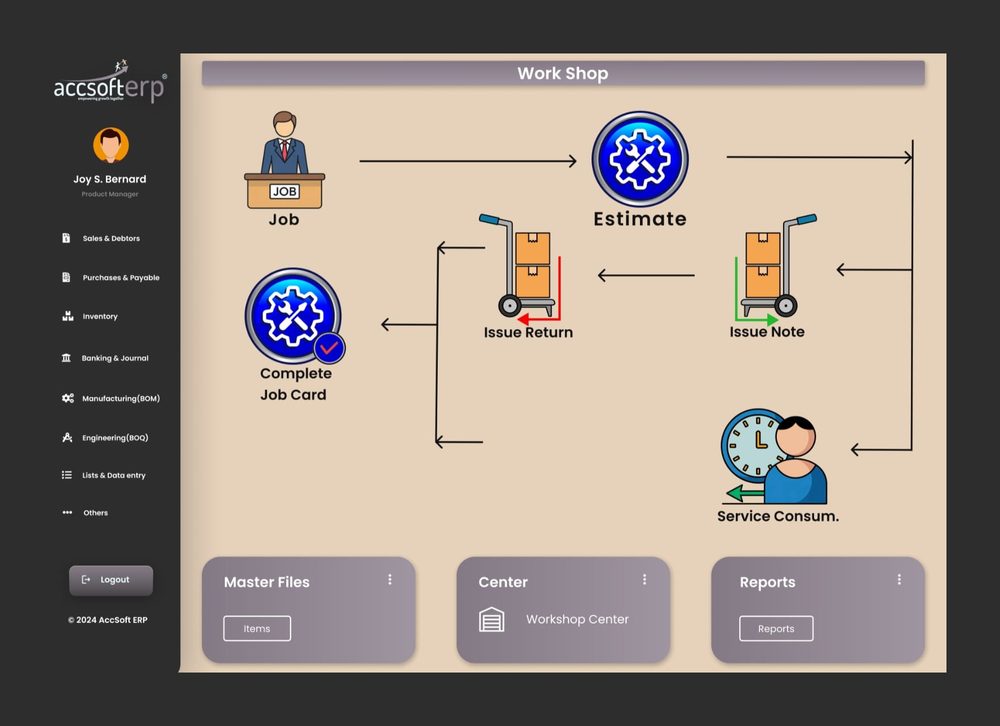
AccSoft ERP's Workshop module takes a job from booking to completed job card. The estimate is approved before any spare part leaves the store, every issue and return is approved before it moves cost, and the completed job card shows actual against estimate for parts and labour.

AccSoft ERP Workshop module dashboard job card workflow Sri Lanka

The Job Card Workflow

Six documents, one chain, with an approval step between each, exactly as the module dashboard shows it.

📄
1
Job
Open a job for the customer and item being serviced, with serial number, start and due dates.
📋
2
Estimate
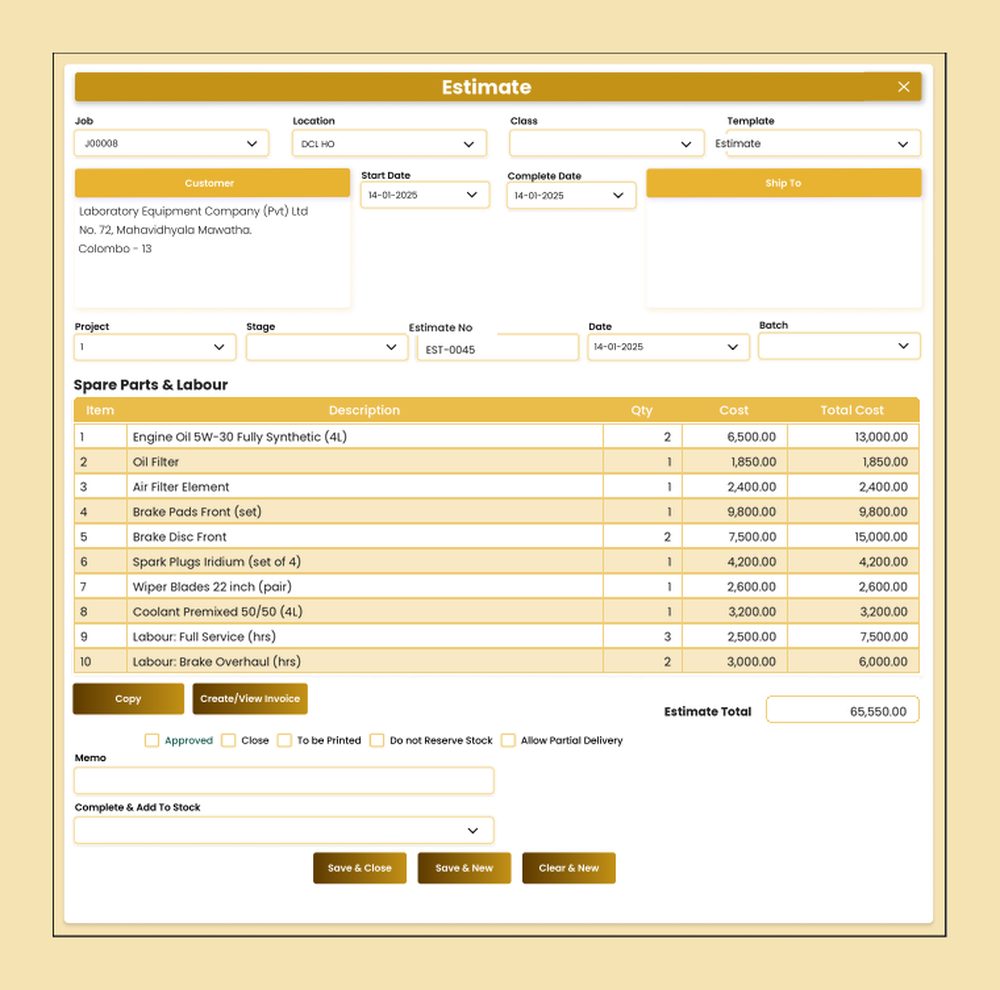
List spare parts and labour with quantity, cost and total. Print or email to customer for acceptance.
🚚
3
Issue Note
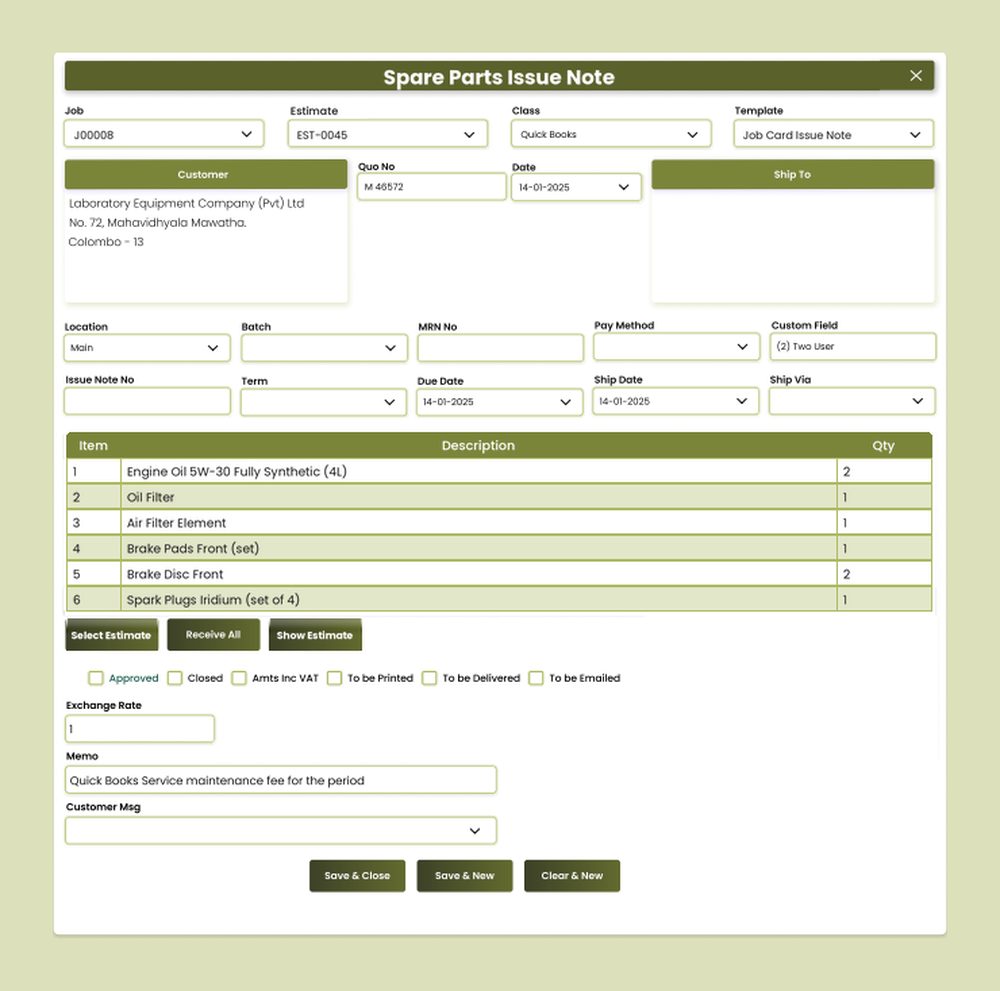
Issue spare parts from the store to the job card. Stock and cost move only after approval.
⚙️
4
Service Consumption
Record technician hours and outside services consumed. Approved before cost moves to the job.
↩
5
Issue Return
Return unused parts to stock. Approved before it reduces job cost.
✅
6
Complete Job Card
Approve completion, compare actual vs estimate, and close the job card ready for invoicing.
AccSoft ERP Workshop workflow dashboard: job, estimate, issue note, service consumption, issue return, complete job card
Module dashboard: the job card workflow from job to completed job card

Approval Control on Every Document

A workshop moves high-value parts and skilled hours every day. AccSoft ERP puts an approval level on every document in the chain. User permissions decide who can approve at each stage.

📄
Job
Approved before an estimate can be raised against it.
✓ Approval Required
📋
Estimate
Approved before any spare part is issued or work starts.
✓ Approval Required
🚚
Issue Note
Approved before stock and cost move to the job card.
✓ Approval Required
⚙️
Service Consumption
Approved before service cost is posted to the job card.
✓ Approval Required
↩
Issue Return
Approved before reversing a stock and cost posting.
✓ Approval Required
✅
Complete Job Card
Approved before the job closes and is invoiced.
✓ Approval Required

See It in Action

Every screen is designed for Sri Lankan service workshops, with VAT, SSCL and local approval workflows built in from the start.

AccSoft ERP Workshop Estimate screen with spare parts and labour, quantity, cost and total cost per line
Estimate with quantity, cost and total cost per line and the estimate total
AccSoft ERP Spare Parts Issue Note screen for parts issued against an approved workshop estimate
Spare Parts Issue Note against an approved estimate

Workshop Reports

Seven ready-made workshop reports, filterable by date range, job, customer, location and Class, and exportable to Excel and PDF.

Job Cards
  • Job Card (All)
  • Job Card (Open)
  • Job Card Estimate
Issues and Costing
  • Job Card Issues Summary
  • Job Card Issues Details
  • Job Card Actual Vs Standard
  • Serial No Tracking

Why AccSoft ERP for Your Workshop?

Everything your service team needs is connected, not bolted on.

🔗
Fully Integrated
Spare parts issues draw down Inventory, purchase costs flow in from Purchases and Payables, the job card invoice goes through Sales and Debtors, and every posting lands in the General Ledger in Banking and Journal, with no double entry.
📈
Estimate to Actual
Parts and labour are costed on the estimate and again on the job card, so you see the variance on every job. The Job Card Actual Vs Standard report makes this visible at a glance.
🔒
Controlled Store
Approval levels on every document mean no part leaves the store and no job closes unchecked. Every document shows its Approved / Close status at a glance.
🇳🇰
Built for Sri Lanka
VAT, SSCL and local document formats are standard, not add-ons. Create and view customer invoices directly from the estimate or job card, with VAT and SSCL applied per line. See our local tax compliance guide.
🔍
Serial Number Tracking
The serial, chassis or engine number is recorded on the job, and the Serial No Tracking report shows every job card raised against that unit. Full service history per item, always available.
🌟
Proven Since 1998
AccSoft Solutions has supported Sri Lankan businesses for over 25 years, with more than 5,000 active installations across workshops, manufacturing, distribution and services.

Who Uses This Module?

Designed for any Sri Lankan business that services customer equipment against an estimate.

Vehicle service centres and garages
Motorcycle and three-wheeler dealers with service bays
Generator, pump and industrial equipment repairers
Air-conditioning and refrigeration service companies
Computer, printer and electronics repair workshops
Any business that services customer equipment against an estimate

Frequently Asked Questions

Common questions about the Workshop module.

Which workshop documents require approval?
All of them. Jobs, estimates, spare parts issue notes, issue returns, service consumption and job card completion each carry an approval level, and user permissions control who can approve at each stage. Every document shows its Approved / Close status at a glance.
Can we send the estimate to the customer before starting work?
Yes. The estimate lists parts and labour with quantity, cost and total cost, and can be printed or emailed for the customer's acceptance before it is approved and work begins.
How is the job card cost calculated?
Actual parts issued, less returns, plus actual technician hours and outside services are accumulated on the job card. On completion the Job Card Actual Vs Standard report shows the variance against the estimate.
Can we track service history by serial number?
Yes. The serial, chassis or engine number is recorded on the job, and the Serial No Tracking report shows every job card raised against that unit giving you a complete service history for each item you service.
Does a spare parts issue update stock immediately?
Yes. When the issue note is approved, stock at that location and batch is reduced and the cost moves to the job card. Issue returns reverse it. All movements are visible in the Inventory module in real time.
Can we invoice the customer from the job card?
Yes. Create/View Invoice raises the customer invoice directly from the estimate or completed job card, with VAT and SSCL applied per line, no need to re-enter details in Sales.
Explore More AccSoft ERP Modules

Workshop connects with every other module in AccSoft ERP.