Home Blogs About Us Contact Us
📞 0777 554 225 Get In Touch
📦 ERP Module

Inventory Control

Every unit in stock accounted for, by location, batch, serial number and expiry date.

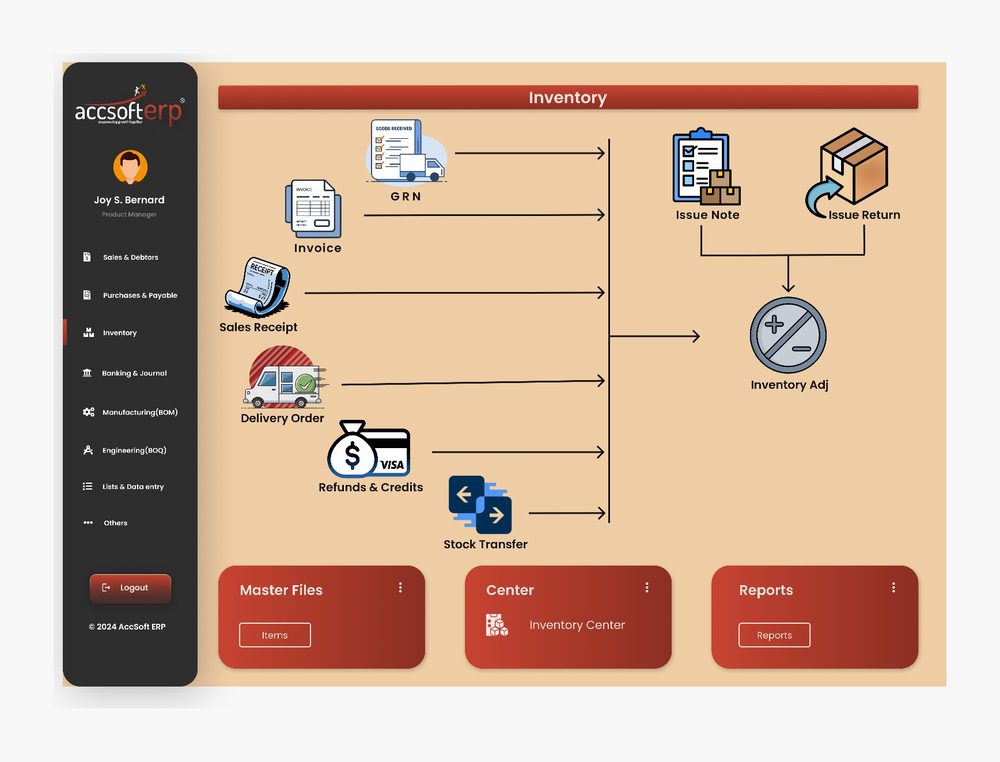
AccSoft ERP's Inventory module is fed by every document that moves stock: GRNs from purchasing, invoices, receipts, delivery orders and credits from sales, issue notes and returns from production, and stock transfers and adjustments raised in the module itself. Every movement is approved before it posts, with full serial number and expiry date tracking.
AccSoft ERP Inventory Control module dashboard stock movement workflow Sri Lanka

How Stock Moves

Eight documents feed one stock ledger, exactly as the module dashboard shows it. Six come from other modules automatically; two are raised here.

Stock In
1
GRN
Goods received against a purchase order in Purchases and Payables, with batch, serial numbers and expiry dates captured at the door.
2
Issue Return
Unused material returned from a BOM, BOQ or job card goes back into stock.
3
Refunds and Credits
Customer returns credited in Sales and Debtors go back into stock automatically.
Stock Out
4
Invoice and Sales Receipt
Sold goods leave stock when the sales document is approved.
5
Delivery Order
Goods delivered before invoicing are taken out of stock on delivery.
6
Issue Note
Materials and spare parts issued to a BOM, BOQ or job card, or to a department, approved before stock moves.
7
Stock Transfer
Move stock between locations, warehouses or branches with a transfer document, approved at both ends.
8
Inventory Adjustment
Correct stock after a count, write off damaged or expired stock, or revalue, with reason and approval required.
AccSoft ERP Inventory workflow dashboard: GRN, invoice, receipt, delivery order, refunds and credits, stock transfer, issue note, issue return, inventory adjustment
Module dashboard: eight documents feeding one stock ledger

Approval Control on Every Movement

Stock is money on the shelf. AccSoft ERP puts an approval level on every inventory document. No stock leaves or changes without sign-off.

🚚
Issue Note
Approved before stock leaves the location and cost moves to the job.
✓ Approval Required
🔄
Stock Transfer
Approved before stock moves between locations or branches.
✓ Approval Required
📝
Inventory Adjustment
Approved before quantities or values change, with reason recorded.
✓ Approval Required
📦
GRN
Approved in Purchases and Payables before stock enters the ledger.
✓ Approved in Purchases
📋
Invoice and Delivery
Approved in Sales and Debtors before stock leaves for the customer.
✓ Approved in Sales
↩
Returns and Credits
Approved in their own modules before stock is reinstated.
✓ Approved in Module

Serial Number and Expiry Date Tracking

Know exactly which unit is where, from the day it arrives to the day it leaves.

🔍
Serial Number Tracking
  • Capture serial numbers at GRN, one per unit, for phones, laptops, machines or any serialised item
  • Serial numbers follow the unit through stock transfers, issue notes, invoices and returns
  • Stock Detail With Serial No and Stock Balance With Serial No reports show exactly which units are in which location
  • Trace any serial number back to its supplier, GRN date and cost, and forward to the customer, invoice or job card it went to
  • Warranty and service history by serial number through the Workshop module
📅
Expiry Date Tracking
  • Record batch number and expiry date at GRN for pharmaceuticals, food, chemicals, cosmetics and any dated stock
  • Stock Details (Expiry Date Item) report lists every batch with its expiry date and days remaining
  • Issue and sell on first expiry, first out so the oldest batch leaves first
  • Write off expired batches with an Inventory Adjustment, approved and with reason recorded
  • Batch numbers print on delivery orders and invoices for full traceability
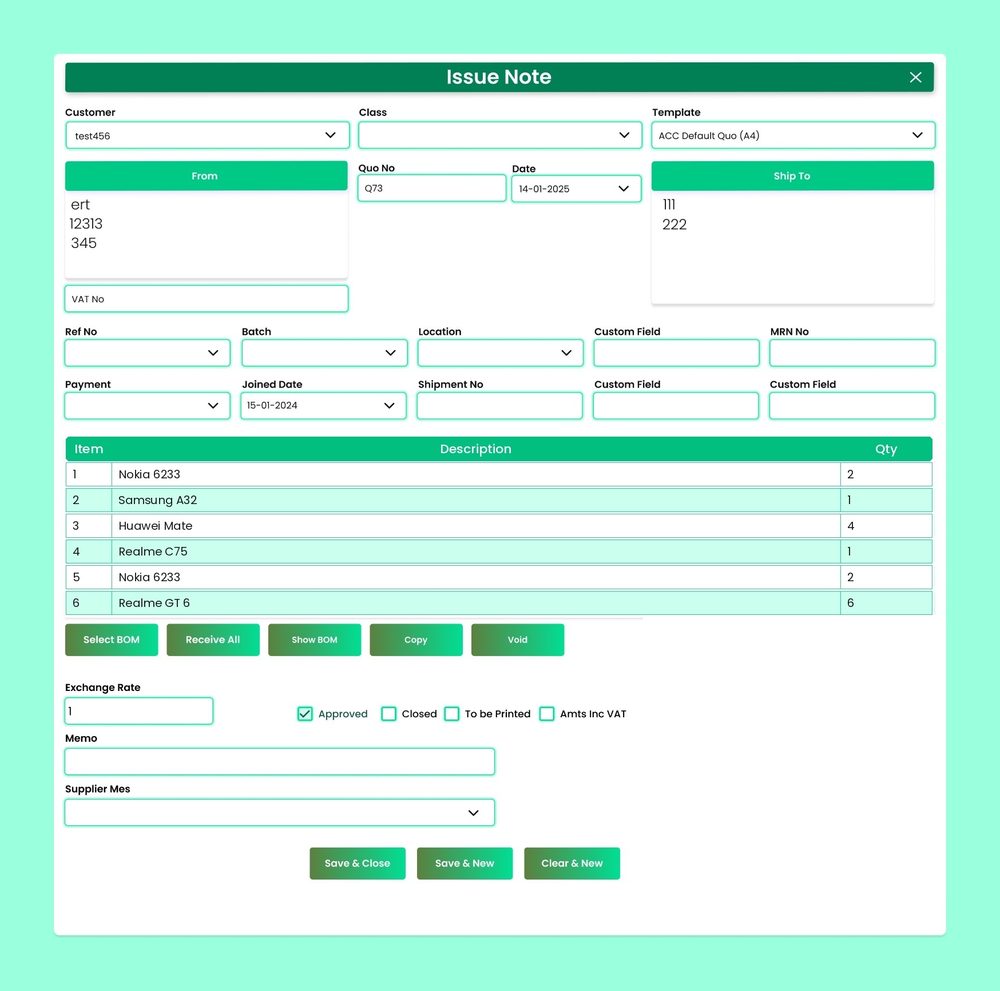
AccSoft ERP Inventory Issue Note screen with item, description and quantity per line
Issue Note with item, description and quantity, batch and location on the header

22 Ready-Made Stock Reports

Filterable by date range, item, location, batch and Class. Exportable to Excel and PDF.

Serial Number 2
  • Stock Detail With Serial No
  • Stock Balance With Serial No
Balances 6
  • Stock Summary
  • Stock Details
  • Stock Details (Expiry Date Item)
  • Location Wise Stock Details
  • Stock By Location (Qty Wise)
  • Stock By Location (Qty With Value Wise)
Valuation 4
  • Stock Valuation Summary
  • Stock Valuation Details
  • Stock Valuation Summary New (Beta)
  • Stock Valuation Error Report
Movement 4
  • Stock Movement Summary
  • Stock Transfer Details
  • Issue Note Summary
  • Issue Note Details
Ageing and Control 6
  • Stock Ageing Report (FIFO)
  • Stock Ageing Valuation Report (FIFO)
  • Stock Ageing Report Detail By Supplier (FIFO)
  • Stock Ageing Report Detail By Days (FIFO)
  • Stock Slow Moving Report
  • Stock Reorder Level

Why AccSoft ERP for Inventory?

One stock ledger fed by every module, always current.

🔗
Fully Integrated
Purchasing, sales, manufacturing, engineering and workshop all move stock through one ledger, so the balance on screen is the balance on the shelf. Every movement posts to the General Ledger automatically.
🔍
Traceable to the Unit
Serial numbers, batch numbers and expiry dates are captured at GRN and follow the unit through every movement to the customer or job. Full trace in both directions at any time.
🔒
Controlled Movements
Approval levels on issue notes, transfers and adjustments mean no stock leaves or changes unchecked. Every document shows its Approved / Closed status at a glance.
📈
Valued and Aged
Stock valuation and ageing reports give you an auditable stock figure and show where cash is tied up, with FIFO ageing by supplier and by day band.
🇳🇰
Built for Sri Lanka
Multi-location, batch and expiry control suit pharmaceutical, food, hardware, electronics and spare parts businesses. Stock posts to the General Ledger with VAT and SSCL handled in the sales and purchase documents. See our tax compliance guide.
🌟
Proven Since 1998
AccSoft Solutions has supported Sri Lankan businesses for over 25 years, with more than 5,000 active installations across every industry and company size.

Who Uses This Module?

Any Sri Lankan business that needs to know exactly what is in stock, where, and what it is worth.

Pharmaceutical and medical supplies distributors tracking batch and expiry dates
Food, beverage and FMCG distributors with dated stock across multiple locations
Mobile phone, computer and electronics dealers tracking serial numbers by unit
Hardware, spare parts and industrial suppliers with multi-location stock
Manufacturers issuing raw materials to production
Any business that needs to know exactly what is in stock, where, and what it is worth

Frequently Asked Questions

Common questions about the Inventory Control module.

Which inventory documents require approval?
Issue notes, stock transfers and inventory adjustments each carry an approval level, and the purchase and sales documents that move stock are approved in their own modules. User permissions control who can approve at each stage, and every document shows its Approved / Closed status at a glance.
How does serial number tracking work?
Serial numbers are captured one per unit at GRN and follow the unit through transfers, issues, invoices and returns. The Stock Balance With Serial No report shows which units are in which location, and any serial number can be traced back to its supplier and forward to its customer or job card.
How are expiry dates handled?
Batch number and expiry date are recorded at GRN. The Stock Details (Expiry Date Item) report lists every batch with days to expiry, stock is issued and sold on first expiry first out, and expired batches are written off with an approved inventory adjustment.
Can we hold stock in more than one location?
Yes. Unlimited locations, with stock by location reports by quantity and value, location wise stock details, and stock transfer documents to move stock between them, each requiring approval.
How is stock valued?
Stock Valuation Summary and Details give the value at any date. The Stock Ageing reports show value by days in stock, by supplier and by day band, all using FIFO costing.
Does the system tell us when to reorder?
Yes. Set a reorder level and quantity per item and location, and the Stock Reorder Level report lists everything below its reorder level so you can raise purchase orders before stock runs out.
Is the item list shared with the other modules?
Yes. A single item master is used across Purchasing, Sales, Manufacturing, Engineering and Workshop, so cost, stock and selling prices are consistent everywhere.

Explore More AccSoft ERP Modules

Inventory connects with every other module in AccSoft ERP.