Home Blogs About Us Contact Us
📞 0777 554 225 Get In Touch
💸 ERP Module

Point of Sale

Bill in seconds at the counter, post to the ledger in the back office.

AccSoft POS is the counter screen of AccSoft ERP. Cashiers pick items from pictures or scan barcodes, take cash, card or split payments, hold and recall bills, and close the day with a Z report. Every sale updates stock, debtors and the General Ledger in the ERP, so the shop and the accounts are never out of step.
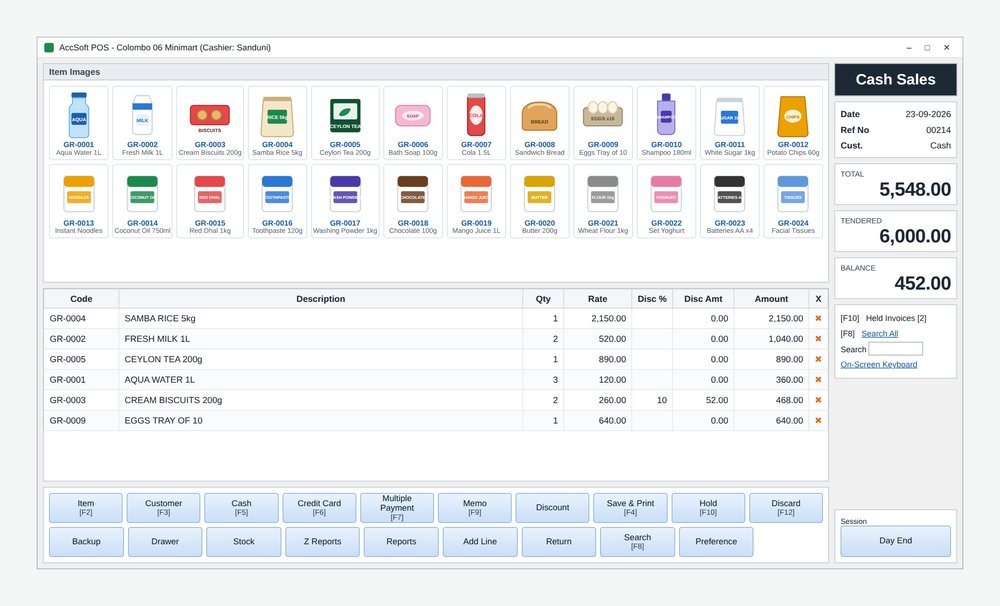
AccSoft POS main screen with item pictures, bill grid, totals and command buttons

The Main Screen

One screen does the whole sale, laid out for a touch screen or a keyboard. Every element is where a cashier expects it.

📷
Item Images
A picture grid of your fast-moving items. Tap a picture to add it to the bill, or scan the barcode, or press F2 and type the code.
📋
Bill Grid
Code, Description, Qty, Rate, Disc % and Amount per line, with a delete cross on every line. Quantities and rates can be edited in place.
💲
Totals Panel
TOTAL, TENDERED and BALANCE in large figures the customer can read across the counter, alongside the customer name and reference number.
💾
Held Invoices
Park any bill and recall it at any time. Any cashier can pick up a held bill, so the queue never stops.
⌨️
Function Key Commands
Every command has a function key, so an experienced cashier never touches the mouse. Designed for speed at peak hours.
📱
On-Screen Keyboard
Built-in on-screen keyboard for counters without a physical keyboard, so touch-only setups need no extra hardware.
AccSoft POS main screen with item pictures, bill grid, totals and command buttons
POS main screen: item pictures, bill grid, totals and function-key commands

Command Buttons and What Each One Does

Every command is reachable by function key so experienced cashiers never slow down at busy times.

Selling
F2
Item
Add an item by code or search faster than scrolling the picture grid.
F3
Customer
Bill a credit customer instead of Cash, pulling their price level and credit limit from the ERP.
Add Line
Insert a blank line to type an item, quantity and rate for unlisted items.
Discount
Line or bill discount by percentage or amount, within the limit set for the cashier.
F9
Memo
A note printed on the bill for the customer.
Taking Payment
F5
Cash
Cash sale with tendered and balance shown clearly for the customer.
F6
Credit Card
Card sale with card type and reference captured.
F7
Multiple Payment
Split one bill across cash, card, cheque, voucher and customer credit.
F4
Save and Print
Post the sale and print the receipt on the bill printer.
Return
Take goods back against a bill, refund or credit, and put the stock back.
Managing the Queue
F10
Hold
Park a bill while the customer fetches something and recall it from Held Invoices.
F12
Discard
Cancel the bill on screen with one key.
F8
Search / Search All
Find a past bill by number, customer or item to reprint or return.
Cash Control and Set-Up
Drawer
Open the cash drawer without a sale, logged against the cashier.
Z Reports
End-of-shift summary of sales and takings by payment type per cashier.
Day End
Close the day, reconcile the drawer, and post the day's sales to the ERP.
Stock
Check stock on hand and price for any item without leaving the bill screen.
Preference
Printer, drawer, barcode scanner, display and receipt settings for the counter.

POS Reports

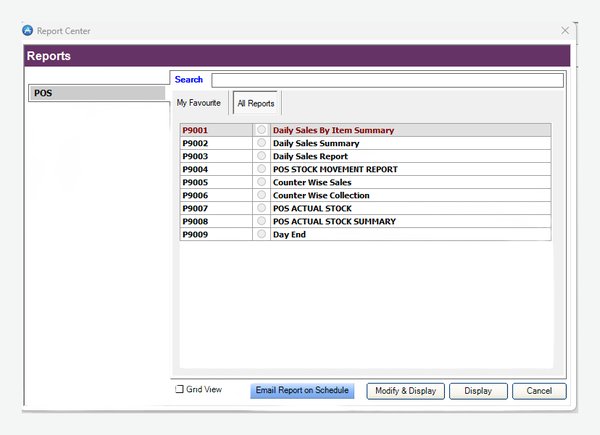
Nine reports from the Report Center, filterable by date, counter and cashier. Add any report to My Favourites and use Email Report on Schedule to send the Daily Sales Summary and Day End to the owner every evening automatically.

POS Report Center 9
  • Daily Sales By Item Summary
  • Daily Sales Summary
  • Daily Sales Report
  • POS Stock Movement Report
  • Counter Wise Sales
  • Counter Wise Collection
  • POS Actual Stock
  • POS Actual Stock Summary
  • Day End
AccSoft POS Report Center with nine POS reports and email on schedule
POS Report Center with email-on-schedule

Why AccSoft POS?

The counter and the accounts in one system, never out of step.

🔗
One System, Not Two
AccSoft POS is part of AccSoft ERP, so there is no re-keying of the day's sales. Every sale posts to Inventory, Sales and Debtors and the General Ledger the moment Day End is run.
⌨️
Built for the Counter
Function keys, item pictures, held bills, split payments and large totals are what a busy cashier needs at 6 pm on a Saturday. Speed and simplicity by design.
💸
Cash Under Control
Logged drawer openings, Z reports per cashier and a reconciled Day End mean every rupee is accounted for. Counter Wise Sales and Collection reports show each counter separately.
🇳🇰
Built for Sri Lanka
VAT and SSCL on the receipt, local bill printers and cash drawers, and support from Colombo. Tax invoices can be raised for credit customers from the same sale.
⚡
Works Offline
The counter keeps billing locally if the network or internet goes down, and syncs to the ERP when the connection returns. A network fault never stops the queue.
🌟
Proven Since 1998
AccSoft Solutions has supported Sri Lankan businesses for over 25 years, with more than 5,000 active installations across retail, pharmacy, hardware, food and more.

Who Uses AccSoft POS?

Any counter-based retail business that also needs its accounts in order.

Supermarkets, minimarts and grocery chains
Pharmacies and cosmetics counters
Hardware, electrical and spare parts shops
Mobile phone and electronics showrooms with serial number capture
Bakeries, cafes and restaurants with counter sales
Showrooms that sell over the counter and on credit from the same stock

Frequently Asked Questions

Common questions about AccSoft POS.

Does the POS work if the network or internet goes down?
Yes. The counter keeps billing locally and syncs to the ERP when the connection returns, so a network fault never stops the queue.
Can one bill be paid partly in cash and partly by card?
Yes. Multiple Payment [F7] splits one bill across cash, card, cheque, voucher and customer credit, all on the same bill.
Can we hold a bill while the customer gets another item?
Yes. Hold [F10] parks the bill and any cashier can recall it from Held Invoices. The counter is free immediately for the next customer.
How do returns work?
Return finds the original bill, takes the goods back into stock and refunds in cash or credits the customer, with the reason recorded.
How is the day closed?
Each cashier runs a Z report at shift end. Day End then reconciles the drawer against takings by payment type, closes the session and posts the day's sales, stock and cash to the General Ledger.
Can we run more than one counter?
Yes. Each counter has its own cashier login, drawer and printer. The Counter Wise Sales and Counter Wise Collection reports show each counter separately.
Does the POS print VAT invoices?
Yes. Receipts carry your VAT registration number with the VAT and SSCL breakdown, and a full tax invoice can be raised for a credit customer from the same sale.

Explore More AccSoft ERP Modules

AccSoft POS connects directly with these modules in AccSoft ERP.